A strong phone case design handoff turns a mood board into instructions a supplier can follow and check. Give every reference an ID and label it as controlling or illustrative. Then rewrite each must-match cue as a checkable requirement, list the fit and behavior questions the images can’t answer, and send one package that names the governing files and revision.
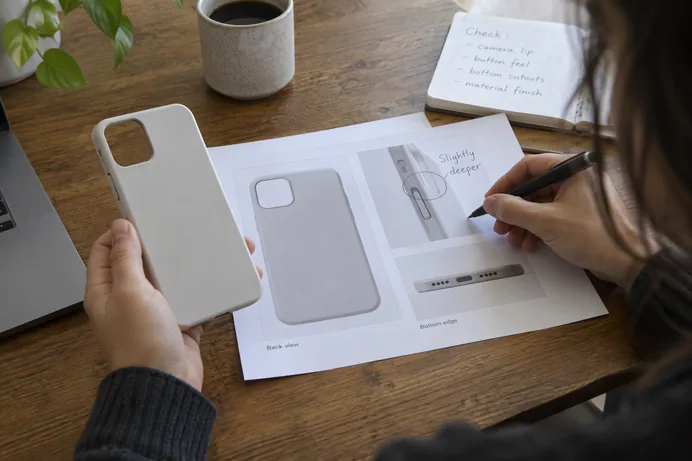
Reference images show direction. They don’t define dimensions, tolerances, or how a sample will be judged. If you leave those gaps open, the supplier fills them with its own guesses. You may not find that out until the first sample arrives.
Four parts of a supplier-ready handoff
The method has four parts, and each one closes a different gap. Labels tell the supplier which inputs carry authority. Written criteria tell it how a sample will be checked. Open questions mark what nobody has decided yet. File control shows which version is current.

Much of this comes from general manufacturing documentation practice, not from phone-case standards. A metal-fabrication drawing guide from Kingsform Metalworks recommends separating reference dimensions from acceptance requirements. It also recommends making each requirement explicit and giving it a practical way to verify it. That guide covers fabricated metal parts. The steps below adapt its principles to a phone case brief. They are not phone-case engineering rules.
Label what must match and what is only illustrative
Give every image, sketch, drawing, or model a short reference ID, such as REF-01 or REF-02. That lets you and the supplier refer to the same item in comments, emails, and sample feedback without confusion.
Next, assign each reference one status:
- Controlling: The supplier must match the named feature in this reference.
- Context only: The reference shows mood, styling direction, or use, but it isn’t a requirement.
- Not controlling: The reference is included for comparison or to show what to avoid.
A controlling label should name its scope. “REF-03 controls the logo placement on the back panel only” is far clearer than “match REF-03.” One photo may show a color you love next to a camera surround you don’t want. If you label the whole image as controlling, you have also asked for the surround.
Keep the core point in mind: an image can set direction without defining size or acceptance. Unless you say otherwise, the supplier can’t tell which details are deliberate and which just happened to be in the photo.
Turn each must-match cue into a checkable instruction
For each controlling cue, write three things:
- The feature or location, such as the outer perimeter, the back-panel logo, or the button covers.
- The intended match, meaning what should look or behave like the reference.
- How it will be assessed, such as a side-by-side visual check under stated lighting, a measurement, or comparison to an approved swatch.
Take a matte perimeter as an example. “Matte like REF-02” still leaves room for interpretation, because a supplier can make several finishes that look matte. A more useful instruction is: “Perimeter finish matches the approved finish swatch in a side-by-side visual check; no gloss bands.” If you don’t have a swatch yet, say so and ask the supplier to propose finish samples for approval.
A centered logo works the same way. “Centered” needs a reference point. Does it mean centered on the back panel, centered between the camera cutout and the bottom edge, or centered on the phone body? Name the reference point. If you know the offset, state it. If you don’t, don’t pick a number from the image. Mark it open and ask the supplier for a dimensioned proposal.
The rule is simple: write a value only when you actually know it. A measurement read off a rendered image is a guess. When a criterion isn’t settled, label it OPEN: supplier to propose so it stays visible until you approve it.
Flag fit and behavior questions that need confirmation
Fit questions belong on a separate list, because design references usually can’t answer them. Start with the exact phone model and version the case is for. A similar-looking model or a different generation can change the cutouts.
Then ask the supplier to confirm or propose criteria for the interfaces and behaviors that matter on a case, such as:
- Camera-opening clearance and how the edge sits around the lens area
- Port access for charging cables and accessories
- Button operation, including whether covered buttons should press easily
- Case retention, meaning how securely the case holds the phone
These items are prompts, not sourced measurements or universal requirements. Treat each one as an open question or a proposed criterion until you and the supplier agree on the exact requirement in writing. Also ask the supplier to point out any conflicts between your references and what the process or phone geometry allows. It’s much cheaper to fix a conflict on paper than in a second round of samples.
Identify the active package and governing revision
The last step makes sure everyone works from the same files. Use one project or part ID, one revision letter, and one date on every file in the handoff, including the brief, annotated reference sheet, drawings, and artwork. The Kingsform guide recommends consistent part numbers and revisions across released files. It also recommends sending a single issue package and stating the controlling definition. Its listed failure mode will sound familiar to many buyers: multiple email attachments become competing masters.
Name the authority directly. For example: “Drawing PC-104 Rev B governs; the reference sheet is context only.” Or state that a coordinated set governs together. If you include a CAD or neutral model, list its file format and version, its units, its coordinate system, and whether its geometry is reference or controlling. That way the supplier doesn’t have to guess the scale or which file wins.
The same idea appears in NASA’s configuration-management reference, which describes unique identifiers for products and documentation and documented baselines. A baseline is an agreed description that later changes are measured against. That is aerospace practice, not a phone-case requirement. Still, the basic habit transfers well: decide what the current approved state is, and label it so no one can mistake it.
Remove superseded files from the active package. Keep them in your own archive so the history stays traceable. When you revise the package, describe what changed, such as “logo moved, finish note revised,” rather than writing only “updated.” The supplier can then see whether the change affects tooling or the sample.
Your next step is to send the identified package for supplier review. Ask the supplier to return answers to the open items and flag any conflicts. Approve those answers before sampling begins. If you’re working with us, we can review your package and send back proposals for the open items before any sample work starts.
FAQs
Can a supplier make a phone case from a mood board alone?
A supplier can start from one, but it will have to interpret a lot. A mood board shows direction. It doesn’t say which details are required, what sizes to use, or how the sample will be judged. Add labels, written criteria, and an open-questions list so the supplier’s assumptions are visible before sampling.
What should I do if I don’t know a dimension or tolerance?
Don’t estimate it from an image. Mark it as open, explain what the feature needs to do, and ask the supplier for a dimensioned or otherwise checkable proposal. Once you approve it, add it to the next revision of the package.
How do I show which file wins if my drawing and reference images disagree?
State the controlling definition in the package, such as “Drawing Rev B governs.” Label the images as context only, or limit them to specific features. If a model is included, say whether its geometry is reference or controlling.
Do I need formal drawings for a phone case design handoff?
Not always. What matters is that each requirement is clear and checkable. An annotated reference sheet with IDs, written criteria, and a revision label can work for simpler designs. Add a drawing when placement, cutouts, or other dimensions need to be controlled.