To specify phone case fit with a screen protector, treat the case and the protector as one combination. Don’t assume each product works with the other just because each one fits the phone alone.
Name the exact phone, case, and protector. Then check edge contact, seating, and everyday use on a paired sample, record what you see, and limit your phone case compatibility claim to the combination you actually checked.
This matters because a case and a protector meet at the edge of the screen. A case lip that works on a bare phone can press on, overlap, or lift a protector edge. A protector that sits flat on its own can shift once a case is snapped on. Neither product’s spec sheet shows this interaction. Only a paired check does.
The method below is a proposed internal process that we suggest for product, quality, and catalog teams. It is not a validated industry standard. It also does not show that any particular case and protector pass. It gives your team a repeatable way to produce a compatibility statement you can back up with your own records.
A paired-sample method for specifying fit
Each section below produces something you can see and record. Together, those records support a statement about one defined configuration.

Name the exact three-part configuration
Start by writing down exactly what the evaluation covers. A useful record has three parts:
- Phone: the model and any relevant variant, such as a regional version.
- Case: the case SKU and its revision.
- Protector: the protector product or SKU, plus its version or variant.
The unit you evaluate is this named combination, not a general product family. “Clear case for Phone X” covers too much. A later case revision or a different protector cut can behave differently at the edges, so each identifier needs its own entry.
On an iPhone sample, you can record the device identity right from the phone. Apple’s support page explains how to find the iPhone model number in Settings. Open Settings, tap General, then tap About. The part number appears next to Model Number, and tapping it shows the model number. This tip applies to Apple devices only. For other phone brands, use that maker’s own identification method.
Prepare the sample and evaluation criteria
Use the intended phone sample with the actual case and protector you plan to name in the claim. Stand-ins, such as a similar protector from another line or an earlier case mold, don’t count. If you substitute anything, the record no longer describes the configuration you plan to publish.
Apply the protector by following its own instructions. Note the installation conditions, such as who installed it, when, and whether an alignment tool or included guide was used. If an edge issue turns up later, these notes help you tell a fit problem apart from an installation problem.
Before you fit the case, write down your team’s acceptance criteria. Decide in advance what counts as acceptable. For example, is light contact at the protector edge acceptable as long as it causes no lifting? Is any visible lifting a fail? These are your internal criteria, not a universal standard. Setting them first keeps the result from being judged after the fact to match what the team hoped to see.
Inspect edge interaction and seating
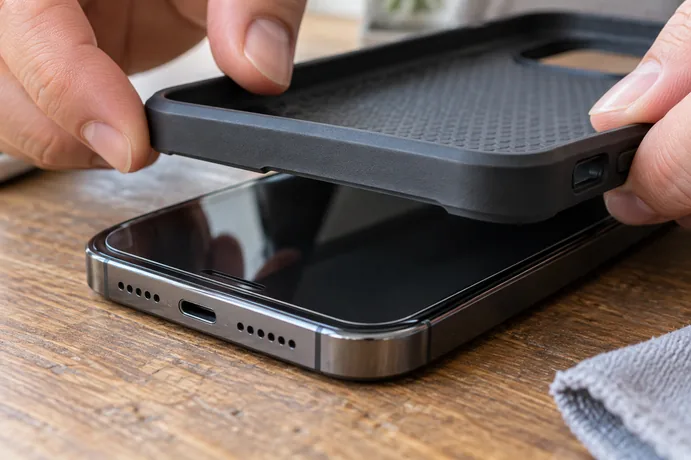
Compare the protector edge before and after the case goes on. This shows whether the case changes how the protector sits. Use this checklist on the paired sample:
- Before the case: record the protector’s edge condition around the full perimeter, including the corners. Note any existing lifting, bubbles, or dust lines so you don’t blame them on the case later.
- After the case: inspect the full perimeter and every corner for contact or overlap between the case lip and the protector edge.
- New changes: note any visible lifting, bubbling, or shifting that wasn’t there before the case went on.
- Protector seating: record whether the protector stays seated with the case installed.
- Case seating: record whether the case fully seats on the phone with the protector in place.
- Photos: take before-and-after photos of the corners and any area where you noted something.
Contact or overlap is not an automatic failure. Some designs meet the protector edge on purpose. Judge what you see against the criteria you set before the check. That way, a recorded “contact at lower corners, no lifting” can pass or fail based on a rule the team already agreed on.
Check selected normal-use actions
Fit also has to hold up during ordinary handling. With both products installed, try the routine actions your team chose for this product, and record the result of each one:
- Taps near screen edges: note whether touches near the edges and corners respond as expected or seem blocked by the case lip.
- Swipes from the edges: try edge gestures and note any interference from the case or the protector edge.
- Case buttons: press each button on the case and note whether it works the phone’s button as intended.
- Openings: check the case openings you select, such as the port or camera cutout, and note any obstruction.
- After handling: recheck the protector edge for any new lifting or shifting.
Record which actions you tried and anything you saw change. Leave untried actions off the record. If you didn’t test drops, long-term wear, or a specific accessory, the record should not suggest that you did.
Record the result and bound the claim
Keep a dated record for each configuration. Include the phone, case, and protector identifiers, the installation conditions, your criteria, each observation, and the photos. This record is what the compatibility statement rests on, so store it where catalog writers and quality reviewers can both find it.
Repeat the full evaluation for every configuration you want the claim to cover. If a listing will name three protectors, evaluate three pairs. A pass for one protector tells you nothing certain about a thinner or wider variant from the same maker.
Then write wording that names what you checked. For example: “Evaluated with [protector product and variant] on [phone model] using case [SKU, revision].” Avoid phrases like “works with all screen protectors” or “fits every glass protector.” Those phrases suggest results for models, revisions, and protector variants that were never evaluated. When a case or protector revision changes, treat it as a new configuration and check it again before you update the listing.
If you’re building compatibility specs for a case line and want to compare notes on how to structure them, you can reach us through our store homepage.
FAQs
Can we say a case is “screen protector friendly” without naming a protector?
That wording suggests the case works with protectors in general, but a paired check only supports the combination you evaluated. Naming the evaluated protector keeps the claim accurate. If you need a broader statement, evaluate each protector it is meant to cover.
Does a case revision need a new evaluation if the old one passed?
Yes. Treat a new case revision as a new configuration. Small changes to the lip or the inner walls can change how the case meets the protector edge, so the earlier record doesn’t cover the revised part.
Is contact between the case and the protector a failure?
Not by default. Judge it against the acceptance criteria your team set before the check. Many teams focus on whether contact causes lifting, bubbling, or shifting, or stops the case from fully seating, rather than on contact alone.
Who should own the compatibility record?
Usually the team that runs the evaluation keeps the dated record. Catalog writers should be able to see it, so the published wording matches the configuration that was actually checked.